



Control one boat accessory from several locations with momentary push buttons and a 12V DC impulse relay. Each button sends a short pulse to the relay. The relay remembers its state: first press ON, second press OFF.
This is the low-voltage DC equivalent of multi-location switching for a boat. The push buttons are only command points; the impulse relay handles the ON/OFF switching of the accessory.
Control points
Cockpit, cabin, helm, berth or electrical panel
Switch type
Momentary push buttons wired in parallel
Relay logic
Each short pulse toggles the output state
Related guide: for the broader switch and relay logic, read When Should I Use a Switch, and When Should I Use a Relay?
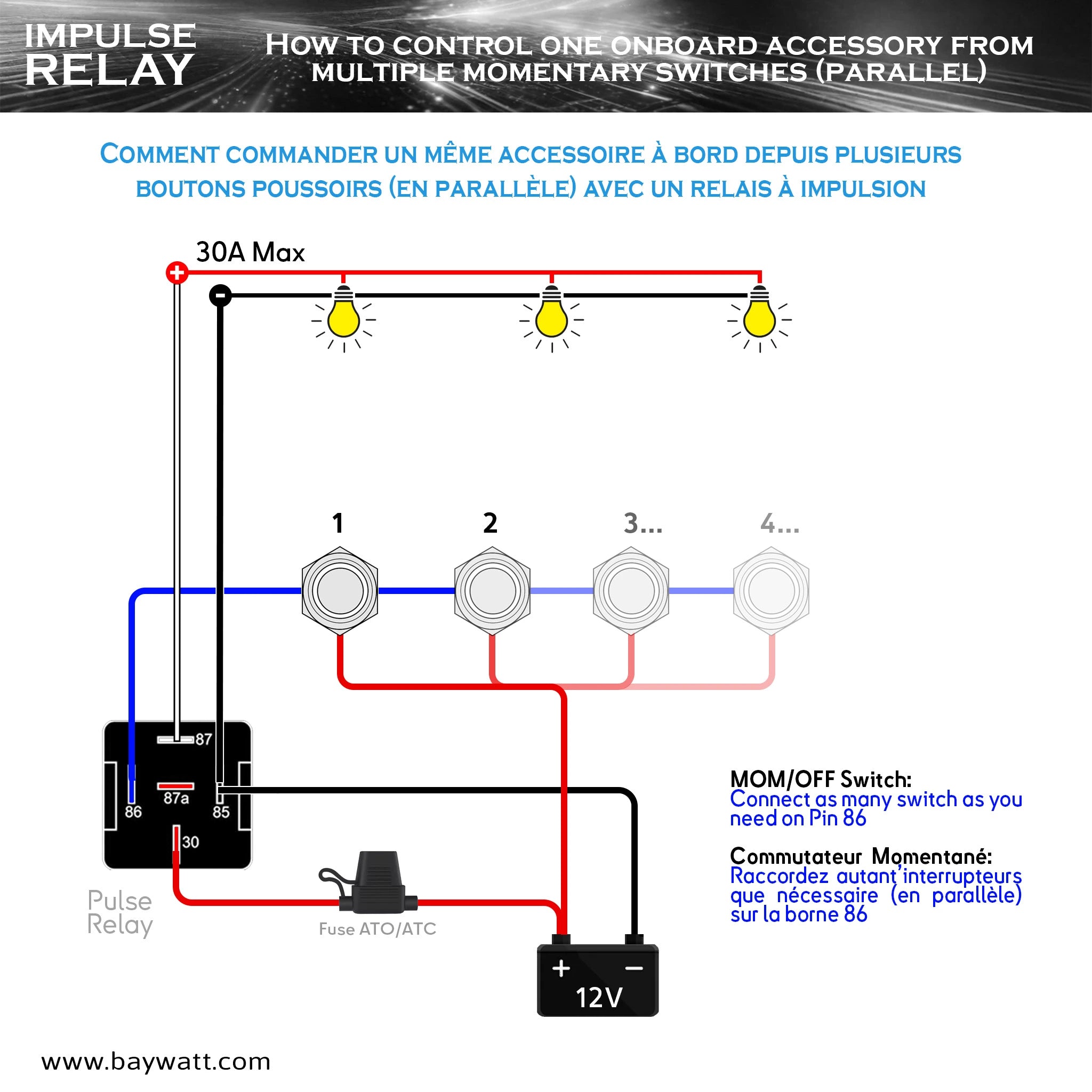
Multi-station push-button wiring diagram
The key principle is simple: every push button is connected to the same trigger line. Pressing any one of them sends the same short command pulse to the relay.
Use a 12V DC impulse relay, not domestic switchgear
A household impulse relay is designed for building electrical installations. It is not the right reference point for a 12V boat dashboard, cabin-light circuit, DC pump control or automotive-style wiring harness.
The BAYWATT impulse relay is a 12V DC bistable / flip-flop relay. A short pulse on the trigger input changes the output state from OFF to ON, then from ON to OFF on the next pulse.
Important: use low-voltage DC components suited to onboard wiring, momentary push-button control and marine or automotive-style terminals. Do not substitute domestic AC switchgear.
Impulse relay logic in one minute
With a normal latching switch, the physical switch position decides whether the circuit is ON or OFF. With an impulse relay, the relay remembers its last state and the push button only sends a brief command.
First press
The relay toggles the accessory output ON.
Second press
The relay toggles the accessory output OFF.
Any control station
Any momentary button connected in parallel can send the next command.
Control path: +12V control feed → any momentary push button → terminal 86 → impulse relay toggles the output.
Parts needed
The circuit is simple, but the correct type of switch matters. Use momentary push buttons, not latching ON/OFF switches.
12V DC impulse relay
The relay changes state at each short pulse and switches the accessory ON or OFF.
Momentary push buttons
Each button sends only a short command signal. Several buttons can be wired in parallel.
Fuse or circuit breaker
The positive supply feeding the relay power contact must be protected close to the source.
Accessory load
Cabin light, cockpit light, deck light, small pump or another compatible 12V device.
Correct cable size
Size the power conductors according to load current, circuit length and protective-device rating.
Optional LED feedback
A separate feedback connection can show the real accessory state on illuminated push buttons.
Impulse relay terminals explained
The BAYWATT impulse relay uses familiar automotive-style terminal numbers. The contact side resembles a standard 5-pin relay, while the control pulse toggles the relay's latched state.
Terminal 85 — Negative return
Control side: relay control ground / battery negative return.
Terminal 86 — Trigger input
Control side: receives the momentary +12V pulse from the push buttons wired in parallel.
Terminal 30 — Fused positive input
Power side: receives the protected 12V positive supply for the relay contact.
Terminal 87 — Normally open output
Power side: the switched output normally used to feed the accessory in this ON/OFF circuit.
Terminal 87a — Alternate contact
Power side: the normally closed / alternate contact. It is generally not needed in this simple ON/OFF installation; its exact state follows the relay's latched contact position.

How to wire several push buttons in parallel
In a multi-station circuit, the push buttons are not wired in series. They are wired in parallel so any station can send the same command pulse to the relay.
Trigger circuit: +12V control feed → push button 1 / 2 / 3 in parallel → terminal 86
Relay return: terminal 85 → battery negative / negative busbar
You can therefore place one button near the cockpit entrance, another at the helm and another near the berth. Pressing any one of them toggles the same accessory.
Clean wiring habit: run a common control feed and common trigger line through the boat. Do not route the full accessory load through every dashboard button.
Step-by-step wiring method
- Isolate the circuit. Disconnect the battery or isolate the positive feed before starting work.
- Install the relay close to the accessory or power-distribution point. This keeps the higher-current power path shorter and cleaner.
- Connect fused positive supply to terminal 30. The fuse or circuit breaker should protect the positive cable as close to the source as practical.
- Connect terminal 87 to the accessory positive. This is the switched output for the standard ON/OFF circuit.
- Connect the accessory negative to the negative busbar. Use a clean return and suitable cable size.
- Connect terminal 85 to negative. This provides the relay control circuit return.
- Wire all momentary push buttons in parallel to terminal 86. Each button sends a short +12V command pulse.
- Test the sequence. Press any button once: the accessory should turn ON. Press any button again: it should turn OFF.
Protection matters: select the fuse or breaker for the load and wiring, and size the power cable for current, circuit length and acceptable voltage drop. The relay rating alone does not determine cable size.
LED feedback on illuminated push buttons
If the push buttons include an LED indicator, the cleanest arrangement is to make the LED show the real accessory state, not simply the presence of control power.
A common method is to use the relay's switched output as the LED feedback signal. When the accessory output is live, the indicator is ON; when the output is off, the indicator is OFF.
| LED wiring method | Result | Comment |
|---|---|---|
| LED powered from relay output | The LED follows the real accessory state. | Best option when each station should show true ON / OFF status. |
| LED powered only from the button feed | The LED may show supply presence rather than output state. | Less useful for multi-station status indication and troubleshooting. |
Check the button wiring: LED topology varies. Confirm whether your illuminated push button uses common negative, common positive or separate LED wires before connecting the feedback circuit.
Typical boat use cases
Cockpit and cabin lights
Turn the same lighting circuit ON while boarding, then OFF from inside the cabin.
Helm and deck control
Control a deck, courtesy or work light from more than one operating position.
Berth light control
Add a bedside command point without routing the full accessory current through the cabin.
Small pump command
Use momentary buttons as command points while the relay handles the switched output.
Panel modernization
Replace one conventional ON/OFF control point with several compact push-button stations.
Van, RV and 4x4 systems
The same 12V DC impulse-relay logic can also be used for suitable automotive accessory circuits.
Common wiring errors
Using latching switches
An impulse relay expects a momentary command. A latching switch can leave the trigger input continuously powered.
Putting push buttons in series
The buttons should be in parallel so any station can send the same command.
No fuse on terminal 30
The positive feed to the relay power contact must be protected close to the source.
Using domestic AC switchgear
Boat control circuits should use suitable low-voltage DC components.
Incorrect LED feedback
If the LED does not follow the real switched output, the operator may not know whether the accessory is actually powered.
Undersized output cable
Size the power cable according to load current, circuit length, voltage drop and fuse rating.
Final checklist
- Use momentary push buttons, not latching ON/OFF switches.
- Wire all control buttons in parallel to the same trigger line.
- Use terminal 86 for the momentary +12V trigger.
- Use terminal 85 for the relay control negative return.
- Use terminal 30 for fused positive power input.
- Use terminal 87 as the normal switched output to the accessory.
- Protect the circuit with the correct fuse or circuit breaker.
- Size power wiring according to load current, circuit length and protective-device rating.
- Use switched-output LED feedback when you want each station to indicate the real accessory state.
Frequently asked questions
What is a 12V DC impulse relay used for on a boat?
It lets one accessory be controlled from several momentary push buttons. Each button sends a short pulse, and the relay toggles the output between OFF and ON.
Can several push buttons control the same 12V accessory?
Yes. Wire the momentary push buttons in parallel to the same trigger input so pressing any one of them toggles the same accessory.
Should I use a domestic impulse relay on a boat?
No. Use low-voltage DC components suited to onboard 12V wiring and the marine environment rather than domestic AC switchgear.
Should the push buttons be latching or momentary?
They should be momentary. The impulse relay changes state at each short pulse, so the control input should not remain permanently powered.
Control one accessory from several push-button stations
A 12V DC impulse relay gives you multi-location control without routing the full accessory load through every push button. The buttons send the command, the relay switches the load and the fuse or circuit breaker protects the power feed.
View BAYWATT 12V DC impulse relay Read the switch vs relay guide


